
BingX Account TP/SL makes it easier to manage risk across multiple futures trading positions by letting traders set a shared take-profit or stop-loss target based on their combined unrealized profit and loss (PnL). When the target is reached, the system automatically submits market orders to close the account's perpetual futures positions, reducing the need to manage each position separately.
Instead of monitoring every position individually, traders can start by deciding how much overall profit they want to secure or loss they are willing to accept. However, the specified target is a trigger rather than a guaranteed closing result, as trading fees, slippage, and market conditions can affect the final outcome. This guide explains how BingX Account TP/SL works, how to use it step by step, how it manages multiple futures positions, and the key considerations before setting a target.
BingX Account TP/SL: 5 Essential Features for Futures Trading
BingX Account TP/SL automatically manages multiple perpetual futures positions based on a shared unrealized profit and loss (PnL) target. Here are five things to know before using the feature.
- One target for multiple positions: Set a take-profit, stop-loss, or both based on the combined unrealized PnL of your perpetual futures positions.
- Automatic position closing: When a target is reached, BingX submits market orders to close all included positions. Pending orders are not automatically canceled.
- Flexible trigger prices: Choose the last price or mark price to calculate unrealized PnL and trigger the target. Last price is selected by default.
- Multiple futures positions: Account TP/SL supports eligible USDT and USDC perpetual futures in Pro mode, including positions across supported margin and position modes.
- Potential differences in closing PnL: Slippage, trading fees, and market conditions can cause actual profits or losses to differ from the target. Account TP/SL helps manage overall risk but does not guarantee a specific closing result.
Read More: What Is Take-Profit and Stop-Loss (TP/SL) in BingX Spot Trading and How to Use Them?
What Is BingX Account TP/SL?
BingX Account TP/SL is a futures risk management feature that lets traders set a take-profit or stop-loss based on the combined unrealized profit and loss (PnL) of their perpetual futures positions. Instead of managing each position separately, traders can set an overall profit target or maximum acceptable loss. When the combined PnL reaches the selected target, BingX automatically submits market orders to close the included positions, helping manage account-level trading risk.
The total unrealized PnL is displayed in USD on the Positions page and includes eligible USDT and USDC perpetual futures positions. Positions opened after Account TP/SL is activated are also included, along with eligible positions using a Trial Fund, Position Voucher, or Bonus Voucher. Coin-M futures positions are excluded from both the calculation and automatic closing process. Actual closing results may differ from the target due to slippage, trading fees, and market conditions.
Read More: What Is BingX Fixed Risk and How to Use It for Futures Trading?
How Does BingX Account TP/SL Work?
BingX Account TP/SL monitors the combined unrealized profit and loss (PnL) of eligible perpetual futures positions using the selected last price or mark price. A take-profit triggers when total unrealized PnL reaches or exceeds the target, while a stop-loss triggers when it reaches or falls below the target. Profitable positions can offset losing positions in the combined calculation.
For example, suppose a trader holds two perpetual futures positions: one has an unrealized profit of 200 USD and the other an unrealized loss of 80 USD. Their combined unrealized PnL is +120 USD. An account take-profit set at +130 USD triggers when the total reaches or exceeds +130 USD, while a stop-loss at −10 USD triggers if the combined PnL falls to −10 USD or below.
|
Position |
Unrealized PnL |
|
Position 1 |
+200 USD |
|
Position 2 |
−80 USD |
|
Combined unrealized PnL |
+120 USD |
|
Account take-profit target |
+130 USD |
|
Account stop-loss target |
−10 USD |
Once either target is triggered, BingX submits market orders to close all included perpetual futures positions. However, the final closing PnL may differ from the target due to slippage, trading fees, and market conditions. Some positions may also remain open if their closing orders cannot be executed. This example is illustrative and excludes fees, exchange-rate changes, and slippage.
Read More: How to Calculate Profit and Loss (PnL) on BingX Futures: A 2026 Guide to Futures Profitability
BingX Account TP/SL vs. Individual TP/SL: What's the Difference?
Account TP/SL and individual TP/SL both help traders manage futures trading risk, but they apply to different positions. Individual TP/SL sets exit targets for a specific position, while Account TP/SL monitors the combined unrealized profit and loss (PnL) of eligible perpetual futures positions and submits market orders to close them together when the account-level target is reached.
|
Feature |
Account TP/SL |
Individual TP/SL |
|
Target |
Combined unrealized PnL of included positions, in USD |
Profit or loss target for a specific position |
|
Scope |
All eligible USDT and USDC perpetual futures positions |
A single position |
|
When triggered |
Submits market orders to close all included positions |
Executes the corresponding position's TP/SL instructions |
|
Best suited for |
Managing overall risk across multiple positions |
Managing individual trade exits |
The main advantage of Account TP/SL is convenience when managing multiple positions. Traders can set an overall profit or loss target without adjusting each position separately. However, positions may close even if their individual TP/SL targets have not been reached, and both methods remain subject to slippage, trading fees, and execution risks.
How to Use Account TP/SL on BingX: A Step-by-Step Guide
BingX Account TP/SL is available for eligible USDT and USDC perpetual futures positions in Pro mode. The account PnL summary appears when you hold two or more futures positions. The feature is rolling out gradually, so it may not yet be available to every user. Follow these three steps to set and manage your account-level profit and loss targets.
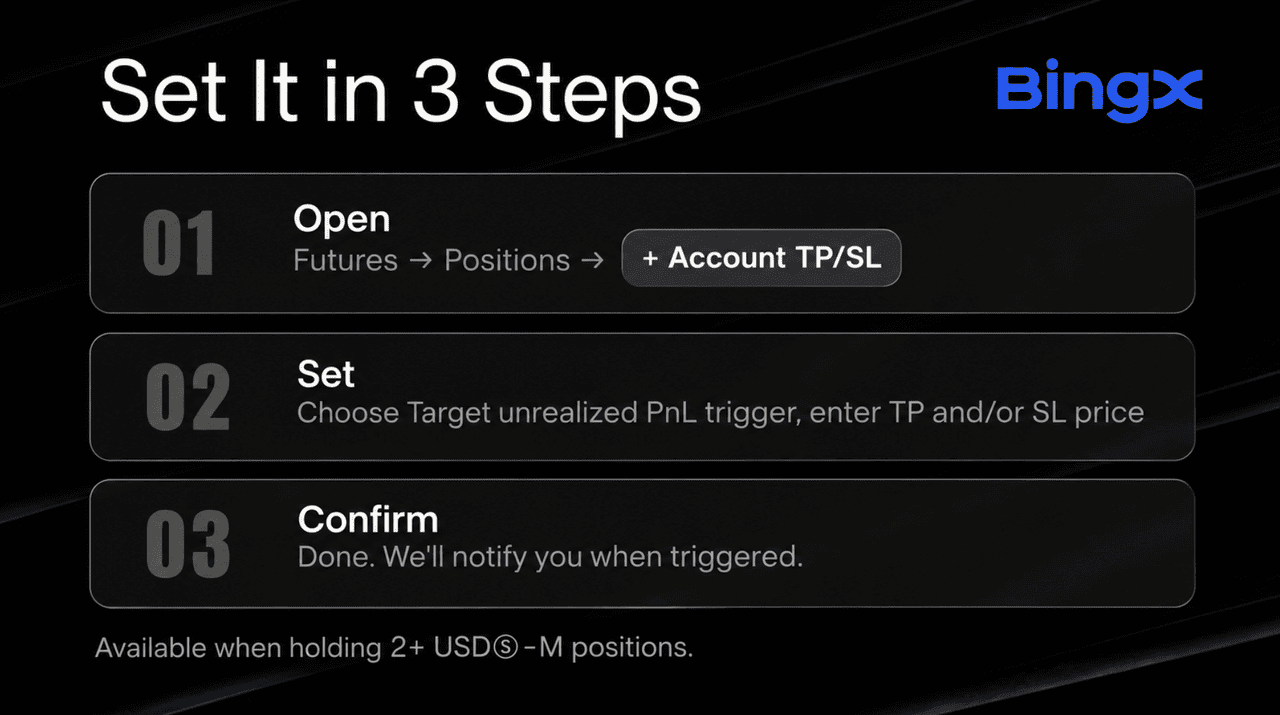
Step 1: Open Your Futures Positions
Log in to BingX and navigate to "Futures → Positions" in Pro mode. When you hold two or more eligible perpetual futures positions, an account PnL summary row appears below the "Positions" tab. Click "+ Account TP/SL" on the right to open the settings.
Step 2: Select Your Trigger Price and Set Targets
Choose Last Price (default) or Mark Price as the trigger price type. Then enter a take-profit amount, stop-loss amount, or both, based on your combined unrealized PnL in USD.
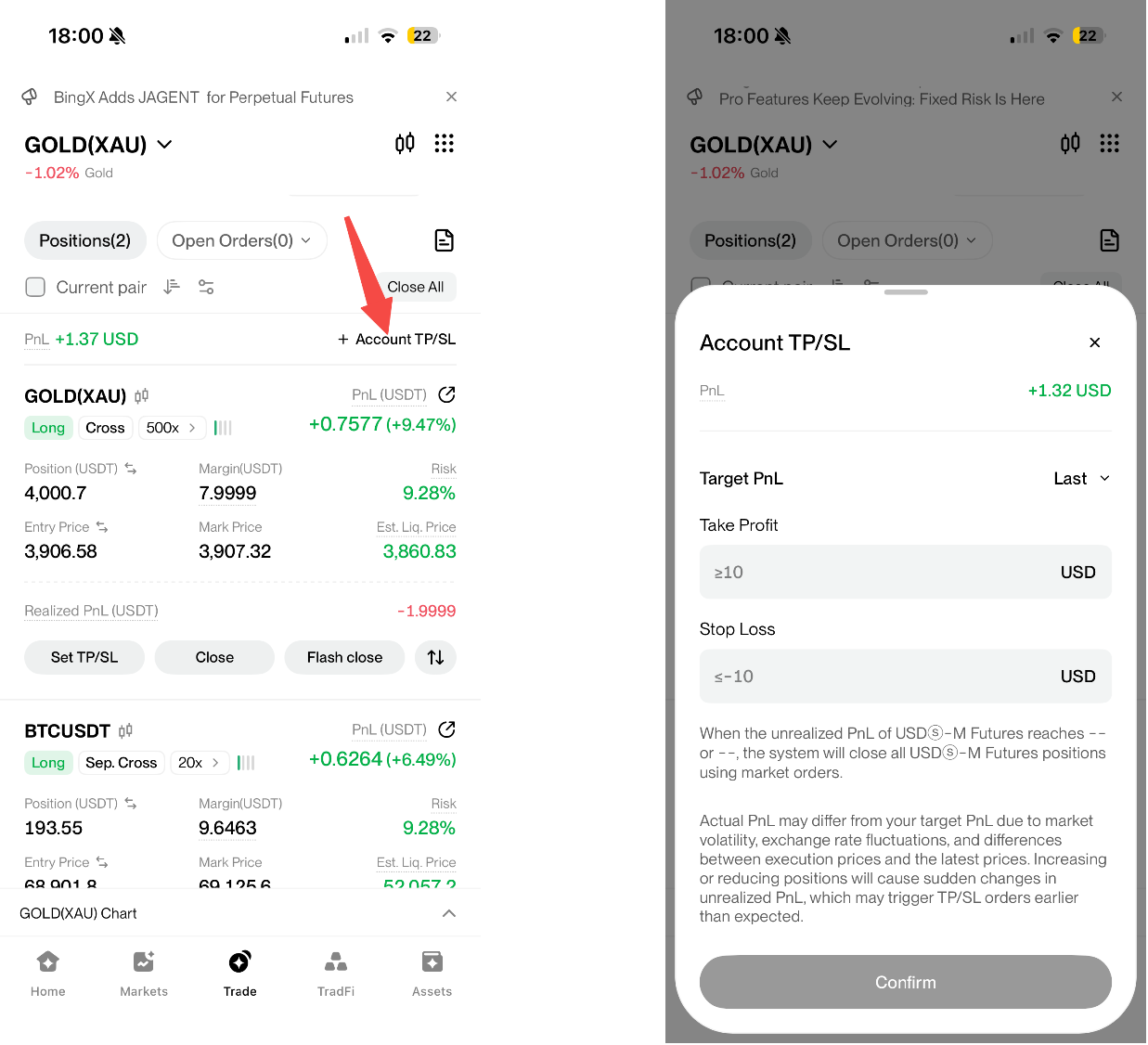
- Take-profit (TP): Must be positive, at least 10 USD, and at least 10 USD above the current total unrealized PnL.
- Stop-loss (SL): Must be negative, no higher than -10 USD, and at least 10 USD below the current total unrealized PnL.
- Decimal places: Target amounts support up to two decimal places.
For example, if your combined unrealized PnL is +120 USD, the minimum TP is 130 USD, while the maximum SL is -10 USD. The permitted range updates in real time, so you may need to adjust your targets if market conditions change before submission.
Step 3: Confirm and Monitor Your Settings
Review your trigger price and target amounts, then click "Confirm". To modify your targets, select the pencil icon in the "Target TP/S"L column. To cancel, tap "Cancel" on the app or click the trash icon on the website.
When a target is reached, BingX submits market orders to close all included positions and sends an app push notification and an in-site message. Closing records appear in "Trade History". Pending orders are not automatically canceled, and any unfilled opening orders that execute afterward may create new positions. If some positions cannot be closed, the system retries while Account TP/SL remains active.
Note: Account TP/SL cannot prevent liquidation, which takes priority. Positions involving non-crypto assets may also remain open while their markets are closed.
Which Positions Are Included in BingX Account TP/SL?
BingX Account TP/SL applies to eligible USDT and USDC perpetual futures positions in Pro mode, allowing traders to manage multiple positions through a shared unrealized PnL target.
- Supported contracts: USDT and USDC perpetual futures. Coin-M futures are excluded.
- Position and margin modes: Supports one-way and hedge modes, cross and isolated margin variants, and single-asset and multi-assets modes.
- Promotional positions: Eligible positions opened with a Trial Fund, Position Voucher, or Bonus Voucher are included, subject to their original voucher rules.
- New positions: Eligible positions opened after Account TP/SL setup are automatically included in the combined PnL and closing action.
- Market restrictions: Non-crypto positions, such as stocks, cannot be closed while their markets are closed. If closing fails, BingX automatically retries, keeps Account TP/SL active for remaining positions, and notifies the trader.
5 Risks to Consider When Using BingX Account TP/SL
BingX Account TP/SL helps manage multiple futures positions through shared profit and loss targets, but it does not guarantee a specific profit or maximum loss. Consider these five risks before using the feature.
- Actual PnL may differ from your target: Slippage, trading fees, exchange-rate changes, and market volatility can cause the final closing PnL to differ from your target.
- Some positions may remain open: Insufficient liquidity, price limits, or closed markets may prevent execution. BingX automatically retries and notifies you, but remaining positions still carry risk.
- Pending orders are not automatically canceled: Account TP/SL closes existing positions only. Unfilled opening orders may execute afterward and create new positions.
- Position changes may trigger TP/SL unexpectedly: Opening, adding to, reducing, or closing positions can change combined unrealized PnL and trigger your target earlier than expected.
- Liquidation takes priority over Account TP/SL: The feature cannot prevent liquidation. Traders should monitor margin requirements, leverage, and overall position risk.
Conclusion: Manage Multiple Futures Positions With BingX Account TP/SL
BingX Account TP/SL helps traders manage multiple USDT and USDC perpetual futures positions using a shared take-profit or stop-loss target. By monitoring combined unrealized PnL and automatically submitting market orders when a target is reached, the feature simplifies risk management across multiple positions.
Before using Account TP/SL, review your included positions, trigger price, and target amounts. Continue monitoring open positions and pending orders after a trigger, as execution prices may differ from your target and some positions may remain open.
Risk Reminder: Futures trading involves leverage and substantial risk. Account TP/SL does not guarantee a specific closing PnL or prevent liquidation. Product availability and trading rules may vary by region, account, and contract.
Related Reading
- What Is BingX Fixed Risk and How to Use It for Futures Trading?
- How to Get Started with Trading Futures on BingX: Beginner’s Guide
- How to Get Started with Perpetual Futures Trading on BingX: A 2026 Beginner's Guide
- 2026 Guide to Risk Management on BingX Futures: Protect Your Capital with Professional-Grade Tools
- How to Calculate Profit and Loss (PnL) on BingX Futures: A 2026 Guide to Futures Profitability
FAQs About BingX Account TP/SL
1. What Is BingX Account TP/SL?
BingX Account TP/SL lets traders set a shared take-profit or stop-loss based on the combined unrealized PnL of eligible USDT and USDC perpetual futures positions. When a target is reached, BingX submits market orders to close the included positions.
2. Does Account TP/SL Guarantee My Target Profit or Maximum Loss?
No. The target determines when closing orders are triggered, not the final result. Slippage, trading fees, exchange-rate changes, market volatility, and unsuccessful closing orders can affect actual profits or losses.
3. Do New Positions Count After I Set Account TP/SL?
Yes. Eligible USDT and USDC perpetual futures positions opened after setup are automatically included in the combined unrealized PnL calculation and closing action. Coin-M futures are excluded.
4. Does Account TP/SL Cancel My Pending Orders?
No. Account TP/SL only closes included positions. Pending orders remain active, and opening orders filled afterward may create new positions. Review your pending orders after a trigger.
5. Why Can't I Find Account TP/SL on BingX?
Make sure you are using Pro mode and holding at least two eligible perpetual futures positions. The feature is rolling out gradually, so it may not yet be available to every account.
6. When Does Account TP/SL End?
Account TP/SL ends when you cancel it manually, when a triggered target results in all positions being fully closed, or when all eligible perpetual futures positions have otherwise been closed.
